Deploying to standard.site
4 min read • Posted on June 19, 2026
What is standard.site?
Section titled “What is standard.site?”Imagine you have your own blog. You’d love to notify readers when you publish something new, or have your posts show up in a unified search. Your first instinct might be to host on platforms like Medium or dev.to. But that would mean giving up ownership of your content.
standard.site lets you keep your own website and register it – and its content – to a decentralized index that any client can search. A bit like what Google is supposed to be: making content discoverable.
ATProto
Section titled “ATProto”The AT Protocol is a decentralized social networking framework that lets you write records – custom JSON – onto a shared database. standard.site is a lexicon built on top of it. To understand how it all fits together, let’s look at the two main concepts.
User identity
Section titled “User identity”Every user has a unique DID (Decentralized ID).
DIDs aren’t human-readable, so users also have a handle on top of them. For instance, my handle is ayc0.github.io and my DID is did:plc:wifmfjqoxnruni5h62e6zp2y.
Handles can come from AT Proto providers like BlueSky, or from custom domains. For custom domains, you prove ownership by hosting your DID at /.well-known/atproto-did, like mine at https://ayc0.github.io/.well-known/atproto-did.
You can browse all records in the ATmosphere at https://pds.ls/.
standard.site lexicon
Section titled “standard.site lexicon”standard.site is based on four types of records:
publication– a website or blog,document– a page, article, or blog post,recommend– a like, similar to YouTube or social media,subscription– which publications a user follows, like an RSS feed.
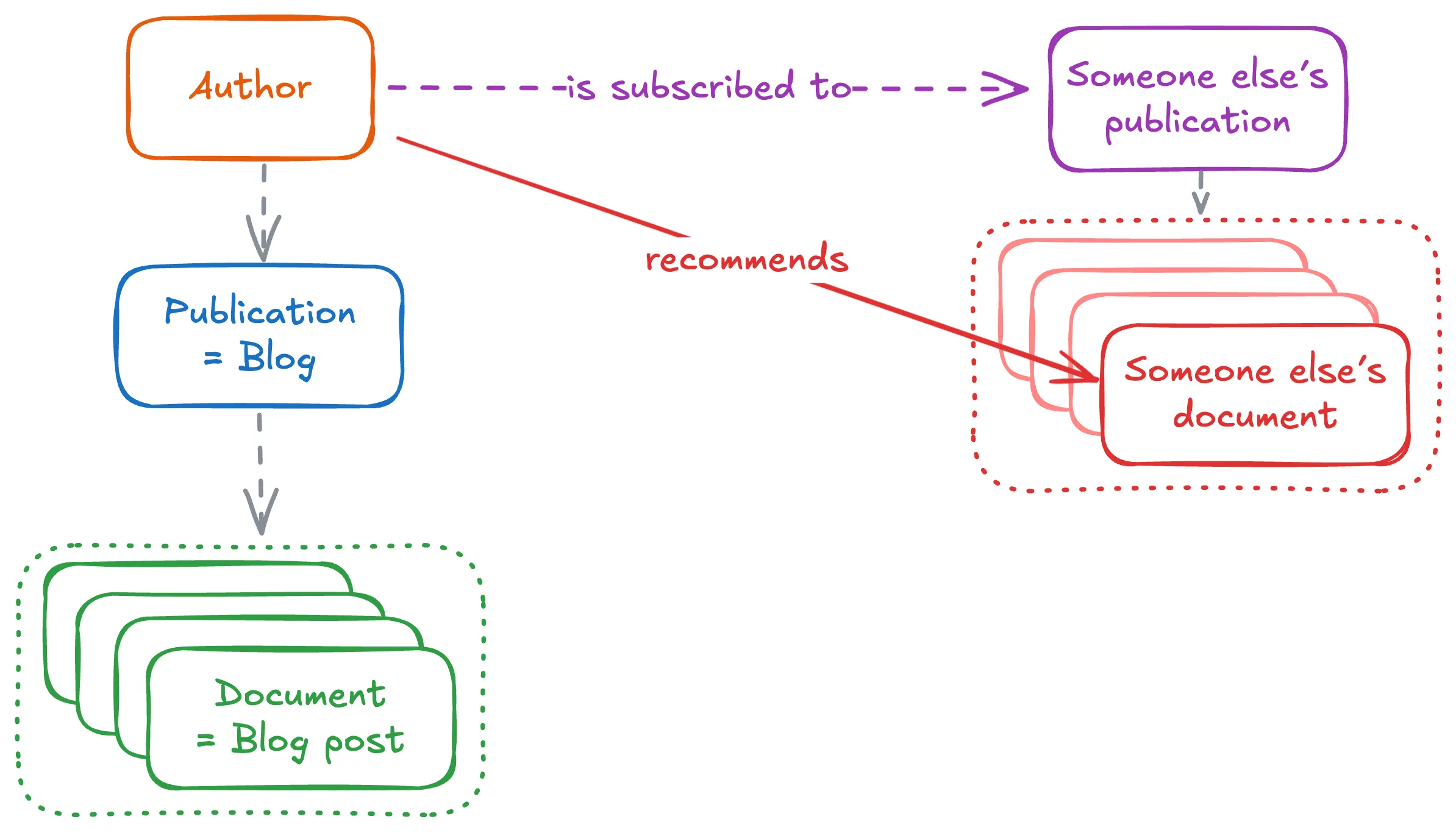
See examples of all of those in https://pds.ls/:
- All publications I have created
- This publication / blog
- All documents / all posts I posted
- 1 specific document (for this post)
- All my recommendations
- 1 specific recommend (for this post)
- All my subscriptions
At the moment of writing, I’m using sequoia, a CLI to help manage content published to standard.site. As this is an open standard, any other tool or manual scripts would work, but I find sequoia quite convenient.
Most of the setup is explained in https://sequoia.pub/quickstart, but in short:
- tell sequoia who you are via
sequoia login/sequoia authso it can publish records on your behalf, - configure sequoia with information about your website (its URL, its ID on standard.site, etc.)
During authentication, sequoia generates an ID for your publication that you need to host at /.well-known/site.standard.publication. Mine is at https://ayc0.github.io/.well-known/site.standard.publication. This proves to standard.site tools that you own the website.
Publishing articles
Section titled “Publishing articles”Each article needs an atUri defined in its metadata. As I’m using Astro, this is stored in the frontmatter of each article. These are auto-generated and auto-filled by sequoia via sequoia publish. See the docs for details.
When publishing an article, I run this CLI at the same time as uploading, to update the ATmosphere.
Once an article is published, you can use the site validator to confirm everything is correctly set up.
Interactions
Section titled “Interactions”Sequoia ships UI components for:
All are optional. When used, they prompt users to log in via their ATmosphere account (BlueSky, Tangled, Eurosky, etc.). All of those can be swapped out for custom implementations if needed, as none are sequoia-specific: the underlying data lives in the ATmosphere.
Subscriptions
Section titled “Subscriptions”Subscribing to a publication adds a record to the decentralized database, but doesn’t do anything on its own. You need a client to read the content of the publications you follow:
- https://pckt.blog/read?filter=hot
- https://leaflet.pub/reader/trending
- https://skyreader.app/
- https://glean.at/
WebSocket Feeds
Section titled “WebSocket Feeds”The AT Protocol pushes events via WebSocket. Every time a record is published, it can be picked up via feeds from any instance.
PDS.ls exposes these – for example, this feed listens to any new post (collections=site.standard.document) published by me (dids=did:plc:wifmfjqoxnruni5h62e6zp2y).
Any client can be built on top of WebSockets using subscriptions, publications, and custom search.
Openness
Section titled “Openness”All ATmosphere data is public, which means:
- anyone can publish records (with an account),
- anyone can read any record.
So by definition: your BlueSky likes, recommendations, and subscriptions are all public. A client could look at your BlueSky followers, check which ones have standard.site publications, and suggest you follow them – which is exactly what Skyreader does.
To me, this is a good idea: you can build a client where anyone can follow creators’ publications without needing an account. It also creates more transparency on why certain feeds recommend certain posts – in trending sections, for instance.
Conclusion
Section titled “Conclusion”This was a very brief and not very detailed overview of the AT Protocol and how to publish articles via the standard.site lexicon.
If you want to see actual examples of how I implemented standard.site for this website, check out these two PRs:
